PDF too big to email or upload?
Type the size you need; the document shrinks on your own computer, without being uploaded to a website. The app starts with the lightest setting and stops at the first one that fits.
- No upload
- No watermark
- No daily limit

Deadline day, one error message
The last step of your application: "Maximum file size is 1 MB." Yours is bigger. And most "compress PDF" sites want your diploma or passport on their server.
Size limits are everywhere: email providers cap attachments per message (Gmail, for example, at 25 MB, and encoding uses up part of that), while job, school and visa application forms, exam registrations and tender systems often allow only a few MB per file, sometimes less. Scanned pages are the usual reason a PDF is too big, because each page is stored as an image.
In HermoPDF: open the document, click Compress, type 1. The app does the rest; no internet needed.
Four steps, no guesswork
- Open the PDF, click Compress.Tools tab ("Araçlar"), "Boyut" (Size) group.
- Type the target in MB.1, 2, 5 and 10 MB are one click; type
0.5for 500 KB,0.2for about 200 KB. - The app steps through the levels.Text stays as it is; images are compressed from about 220 DPI down to 72 DPI. It stops once the target is reached.
- See before / after.The smaller copy is a new file; your original stays untouched.
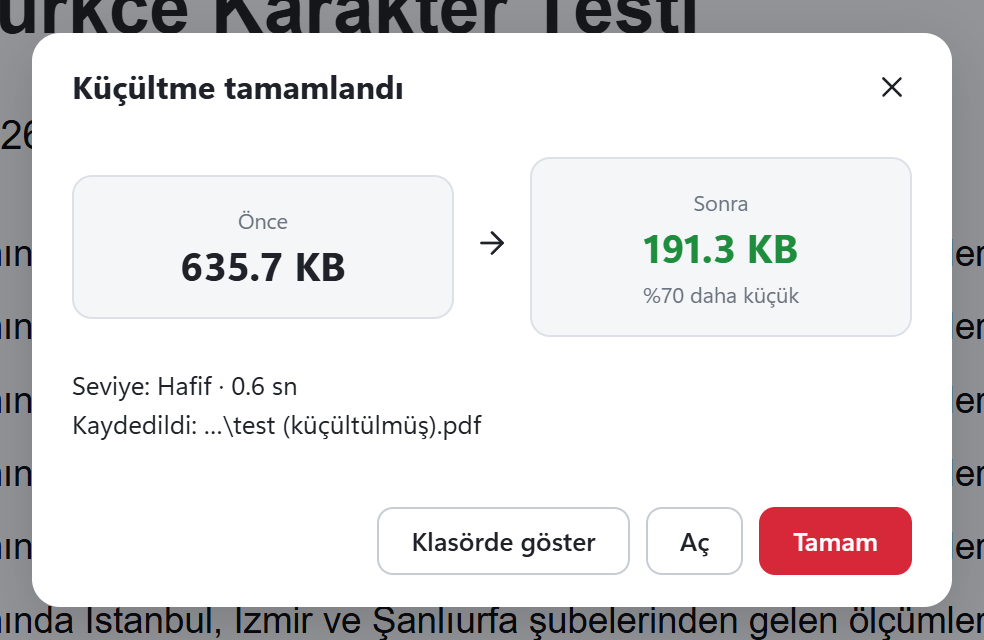
A real test run
4-page synthetic test document (text and a photo) · 4 pages
Asked for: 0.2 MB · 0.6 s
Measured in the app itself with a synthetic test document. Your results will depend on your file.
Three things you should know
1. A very small target can hurt readability
Squeezing a scan down to 200 KB can blur the text. After saving, zoom in and check; if needed, try a slightly bigger target.
2. The target cannot always be reached
The app says so plainly and gives you the smallest size it managed.
3. Check the limit where you upload
Some count each file, some the total. Leave a margin: for a 2 MB limit, type 1.8.
As a last resort, "scan mode" turns pages into images: text stays selectable, links may be lost. If links matter, untick that permission.
Squeezing out a bit more
Greyscale
No colour needed? Convert images to greyscale.
Metadata clean-up
Embedded thumbnails are removed. On by default.
Lots of files?
Use batch processing to apply one target to all.
Questions about compressing PDFs
How do I compress a PDF to under 1 MB?
Open the file, click Compress on the Tools tab, type 1 (or click "1 MB") and confirm. The result is saved as a new file.
Can I compress a PDF to 200 KB or 500 KB?
Yes: type 0.5 for 500 KB or 0.2 for about 200 KB. With targets this small, check readability.
Is my file uploaded anywhere?
No. Compression runs entirely on your computer, even with the internet off.
Is it paid? Does it add a watermark?
No. It is in the free version; no watermark, no daily or file limit.
Can I merge several documents and then compress them?
Yes: Merge first, then Compress. For many files, batch processing applies the same target to all.
Got a PDF job waiting? Sort it out now.
Download free, install, open. No account, no card, no ads, no watermark.